

Lec10: File-System Interface
文件与目录的概念、访问方式、共享与保护、文件系统挂载,以及目录结构(单层/两层/树形/无环图/通用图)。
课程导航与课程讲次
课程讲次
文章目录
感觉这一章不需要花费太多的时间,就看看别人的笔记吧:xyx的笔记
File-System Interface
文件系统的定义如下所示:
- The way that controls how data is stored and retrieved in a storage medium.
- File naming
- Where files are placed
- Metadata
- Access rules
File concept
文件的定义如下所示:
- Contiguous logical address space
- A sequence of bits, bytes, lines, or records. The meaning is defined by the creator and user.
- 实际上,文件就是一串连续的地址,其意义由人类所决定。
- Types:
- 文件分类如下
- Data
- numeric
- character
- binary
- Program
- Source
- Object
- Executable
- Data
File Structure
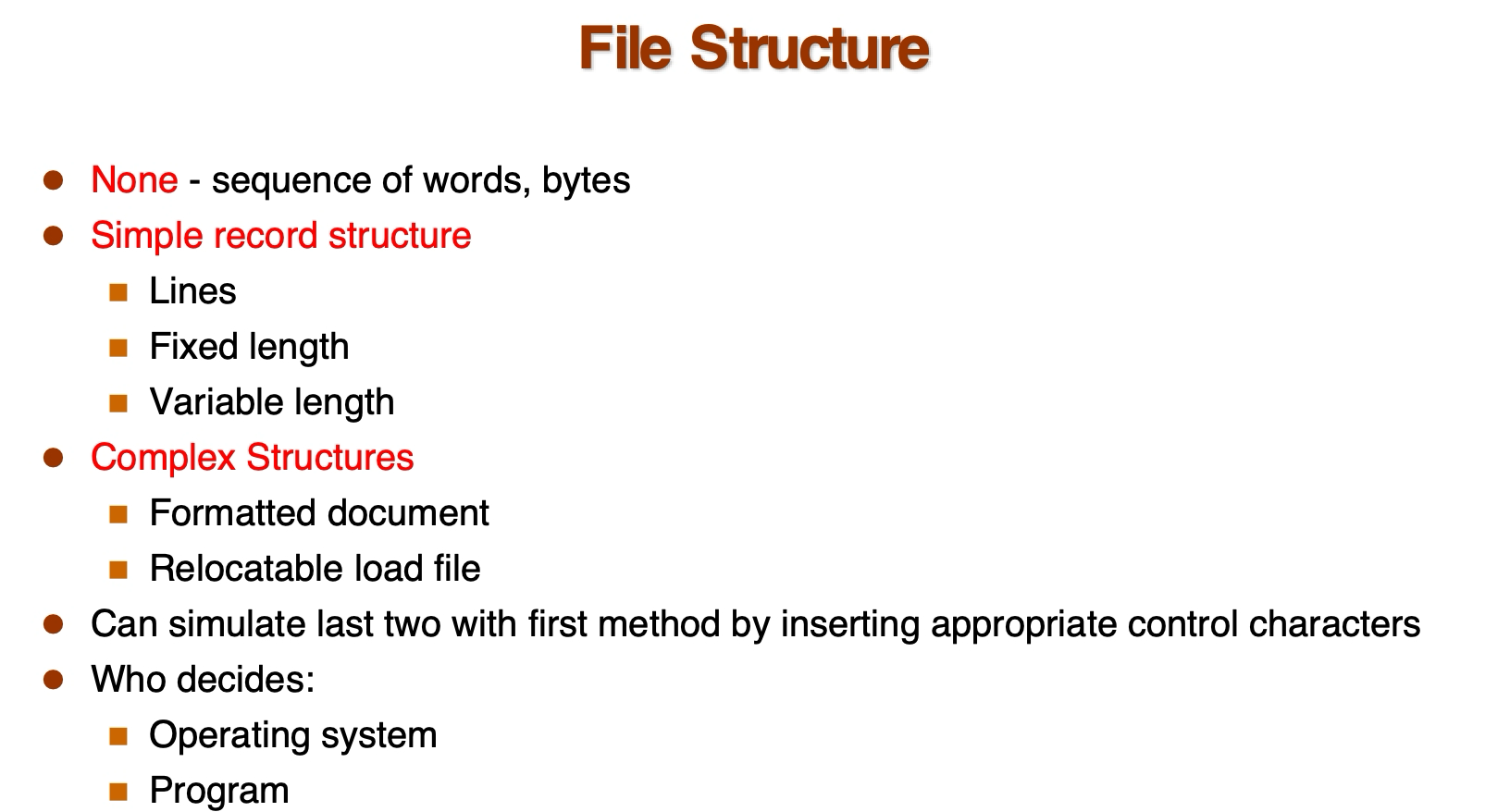
文件有很多种结构,最简单的一种就是单单一串字符串。我们也可以使用特殊符号进行分割。常见的嵌套文件结构有 json 等。
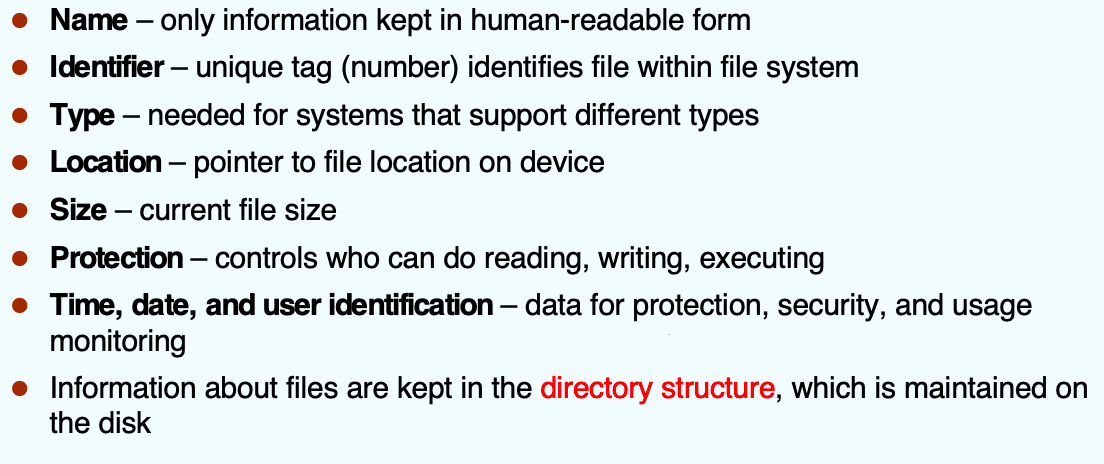
File Attributes
File Operations
- File is an abstract data type
- Create
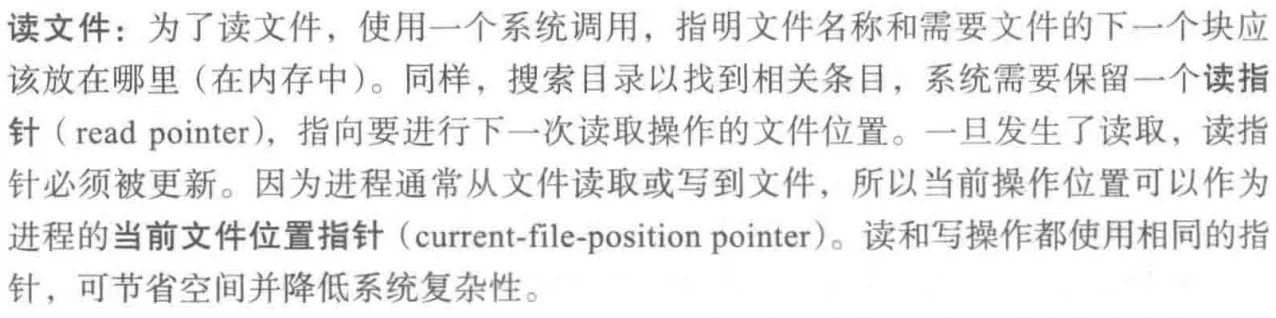
- Write – define a pointer
- Read – use the same pointer Per-process current file-position pointer
- Reposition within file (file seek)
- Delete
- Truncate

- Open(Fi) – search the directory structure on disk for entry Fi, and move the content of entry to memory
- Close (Fi) – move the content of entry Fi in memory to directory structure on disk

Open-file table
- Open() system call returns a pointer to an entry in the open-file table
通常,操作系统会维护两级的内部表:每个进程表和整个系统表:
- Per-process table
- 每个进程表追踪它所打开的所有文件。
- Current file pointer
- 每个文件的当前文件指针
- Access rights
- 文件访问权限
- …
- System-wide table
- Open count…
- 通常,系统打开文件表为每个文件关联一个 Open count,表示有多少进程打开了这个文件。每次 open() 的时候加一,close() 的时候减一。
- Disk location
Open Files
总而言之,每个打开文件具有以下关联信息:(这一部分我感觉中文的更好,英文的有点太抽象了)
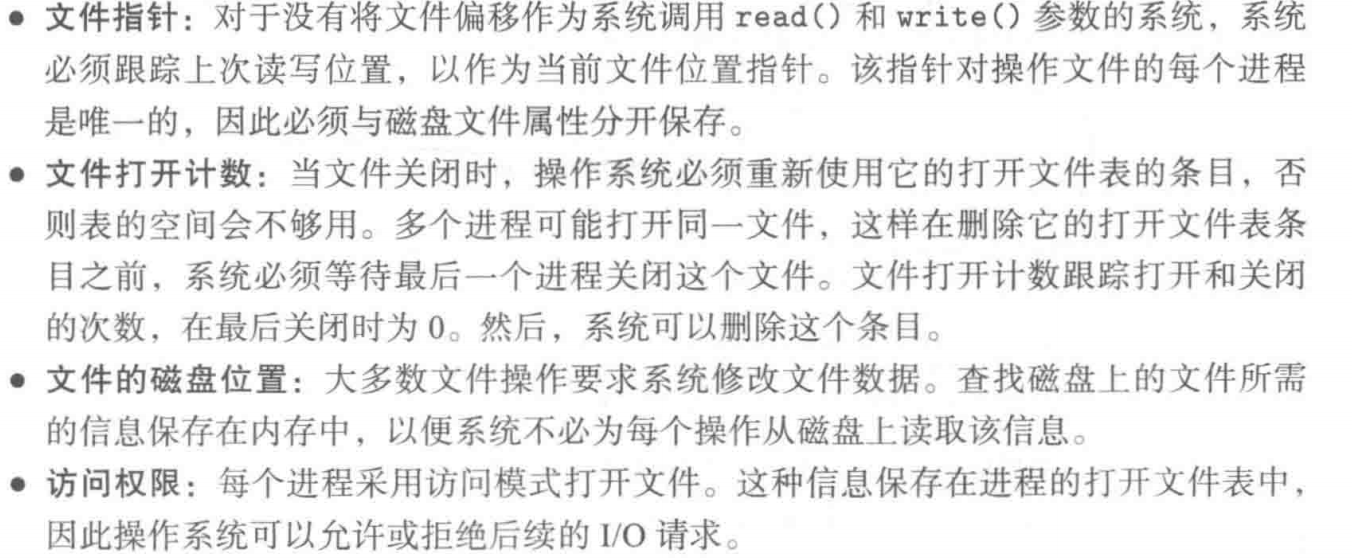
- File pointer: pointer to last read/write location, per process that has the file open
- File-open count: counter of number of times a file is open – to allow removal of data from open-file table when last processes closes it
- Disk location of the file: cache of data access information – system doesn’t need to read it from disk for every operation.
- Access rights: per-process access mode information
Open File Locking
- Provided by some operating systems and file systems
- Mediates access to a file (by multiple processes)
- File locks are similar to reader-writer locks
- Shared lock (reader)
- Exclusive lock (writer)
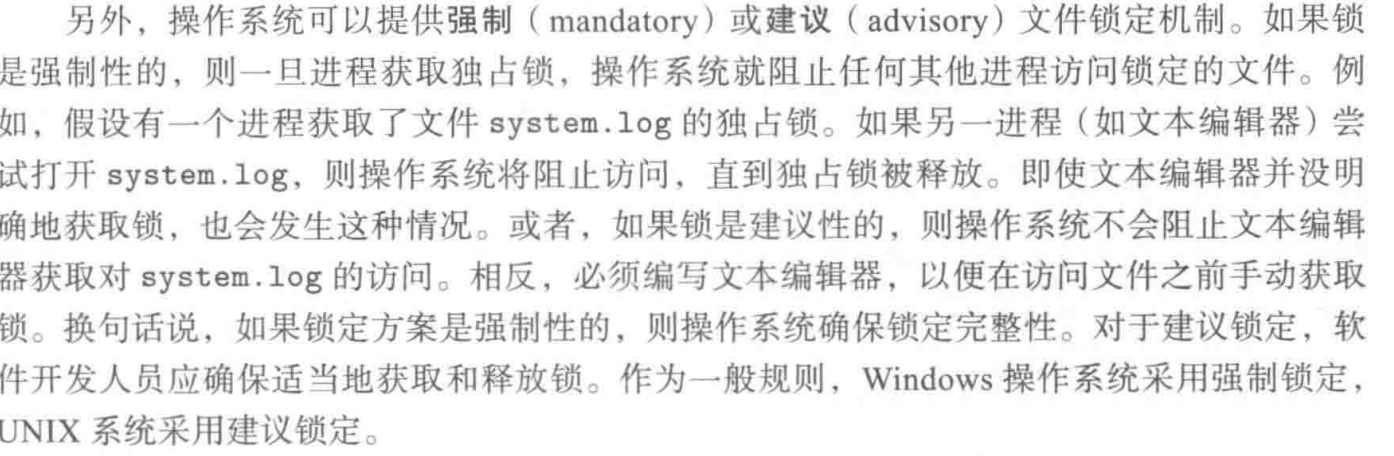
- Mandatory or advisory:
- Mandatory – access is denied depending on locks held and requested
- Advisory – processes can find status of locks and decide what to do
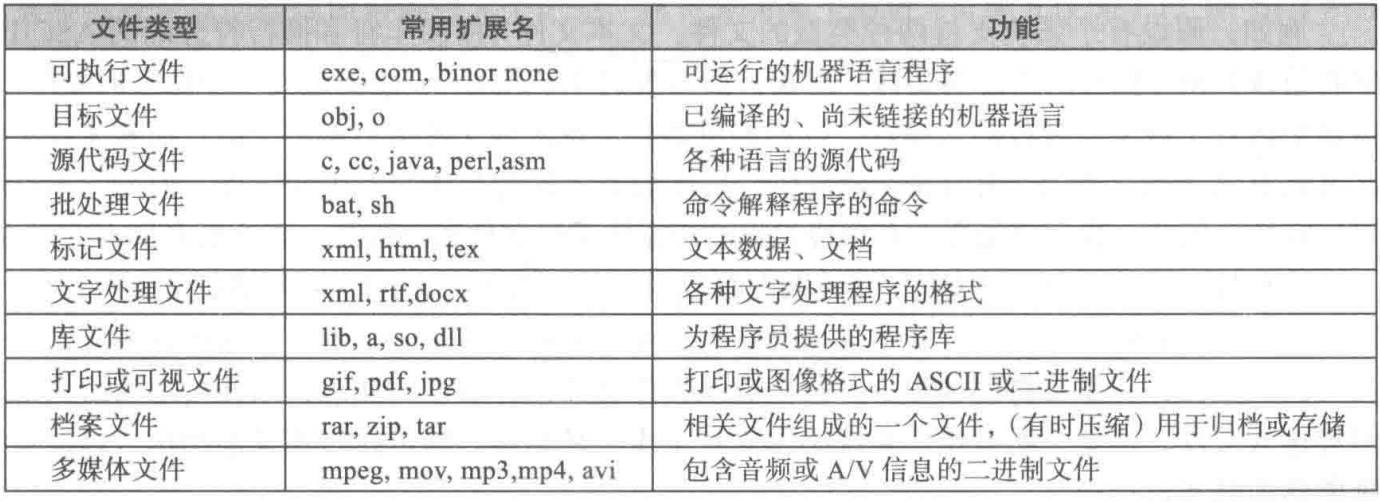
File Types
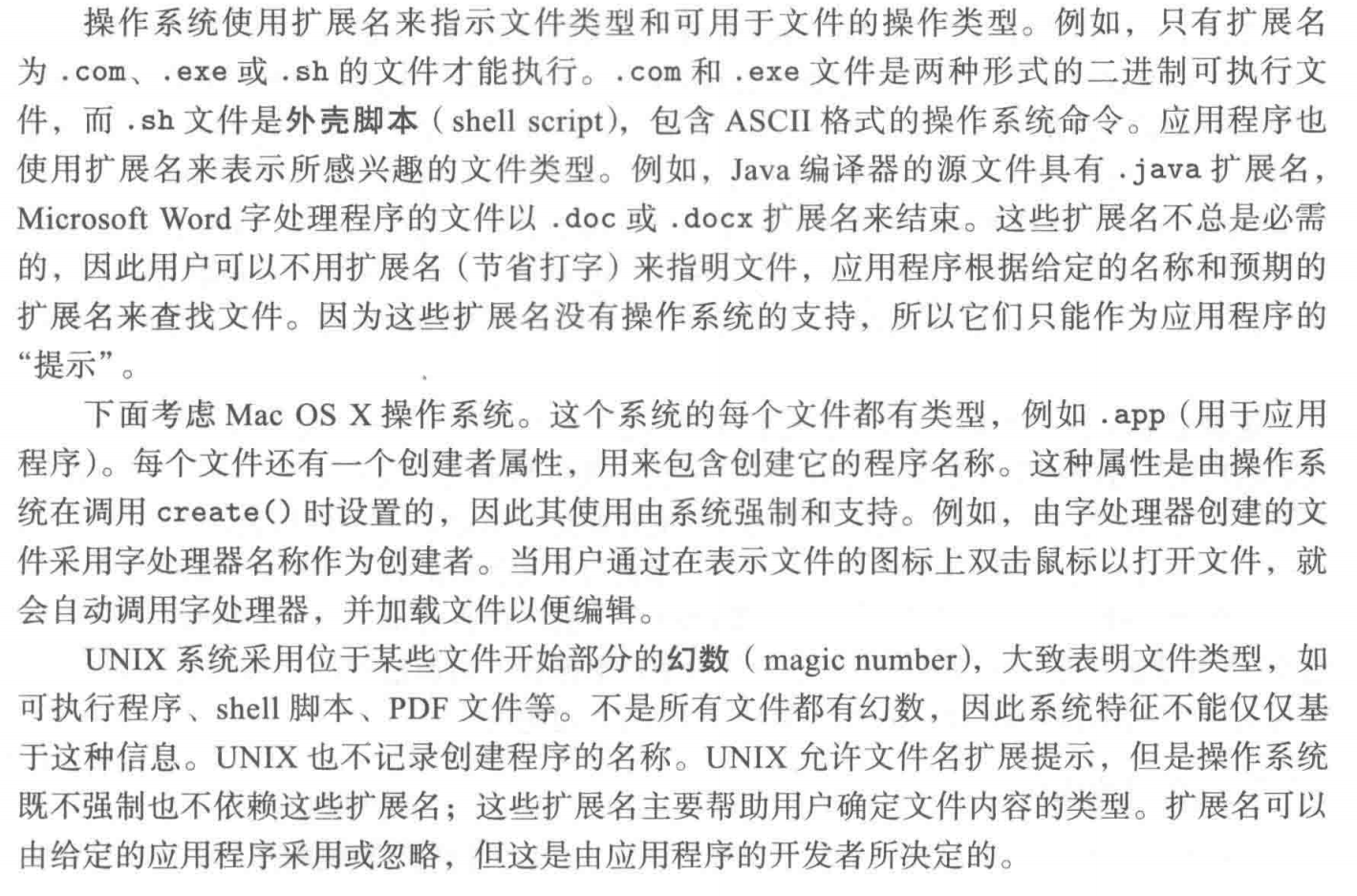
- Unix 系统使用 magic number 来表示文件类型。这个字段存在于文件的某一偏移。
Access Methods
有两种访问方式:
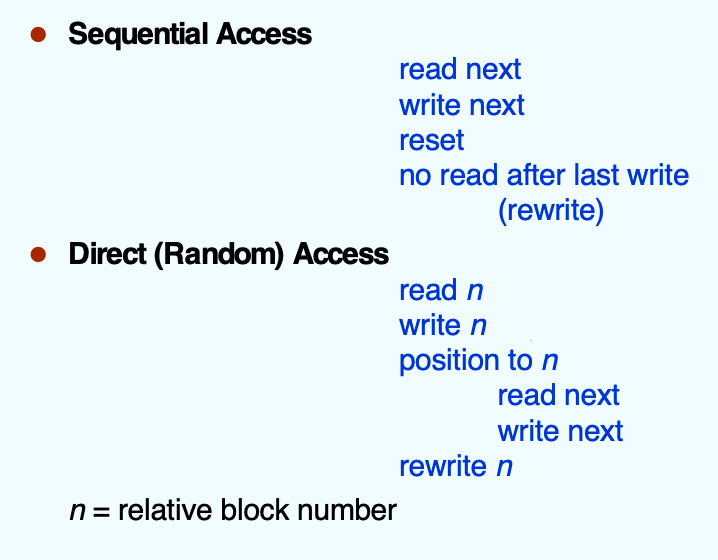
一种是很原始的顺序访问,另一种是现在在使用的随机访问(意思是任何地方都可以访问)。
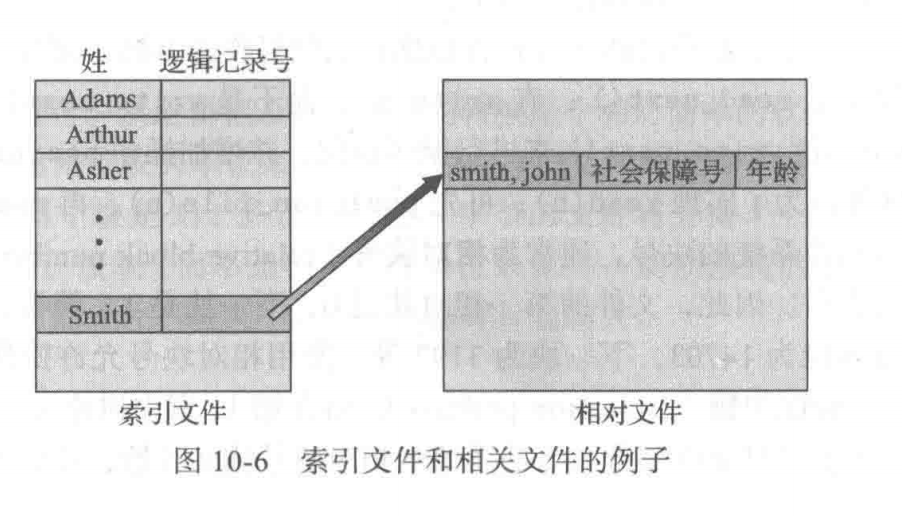
其他访问方法可以建立在随机访问方法上。这些访问通常涉及创建文件索引(index),比如:
Directory and Disk Structure
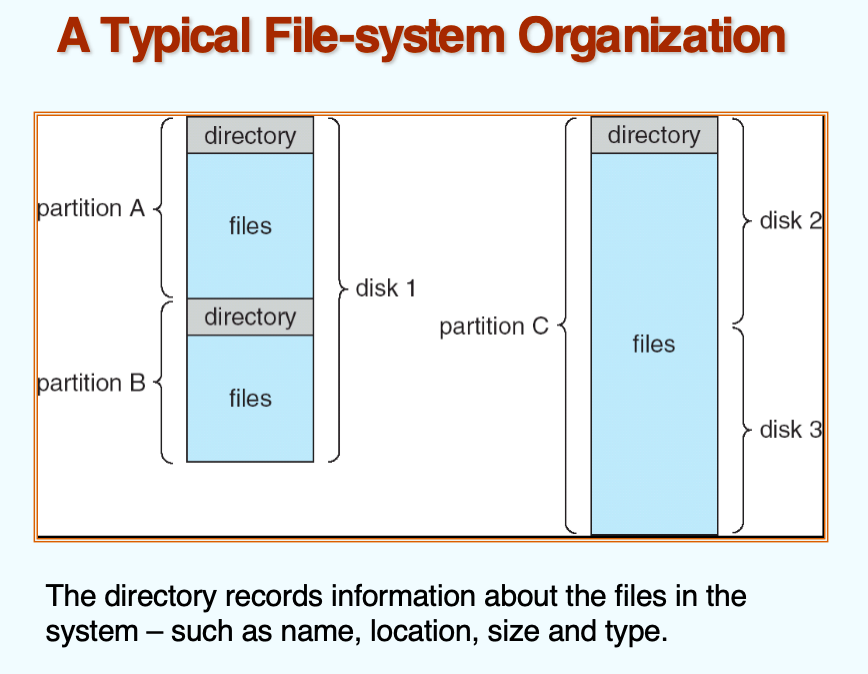
volume(卷)
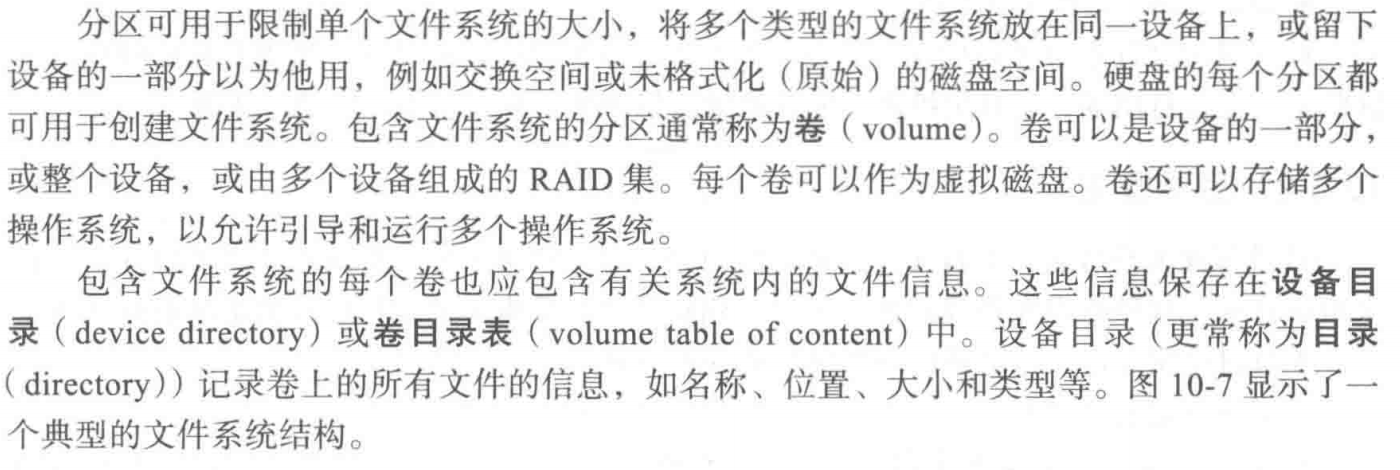
- 包含文件系统的分区称为卷
- 卷可以存储多个操作系统
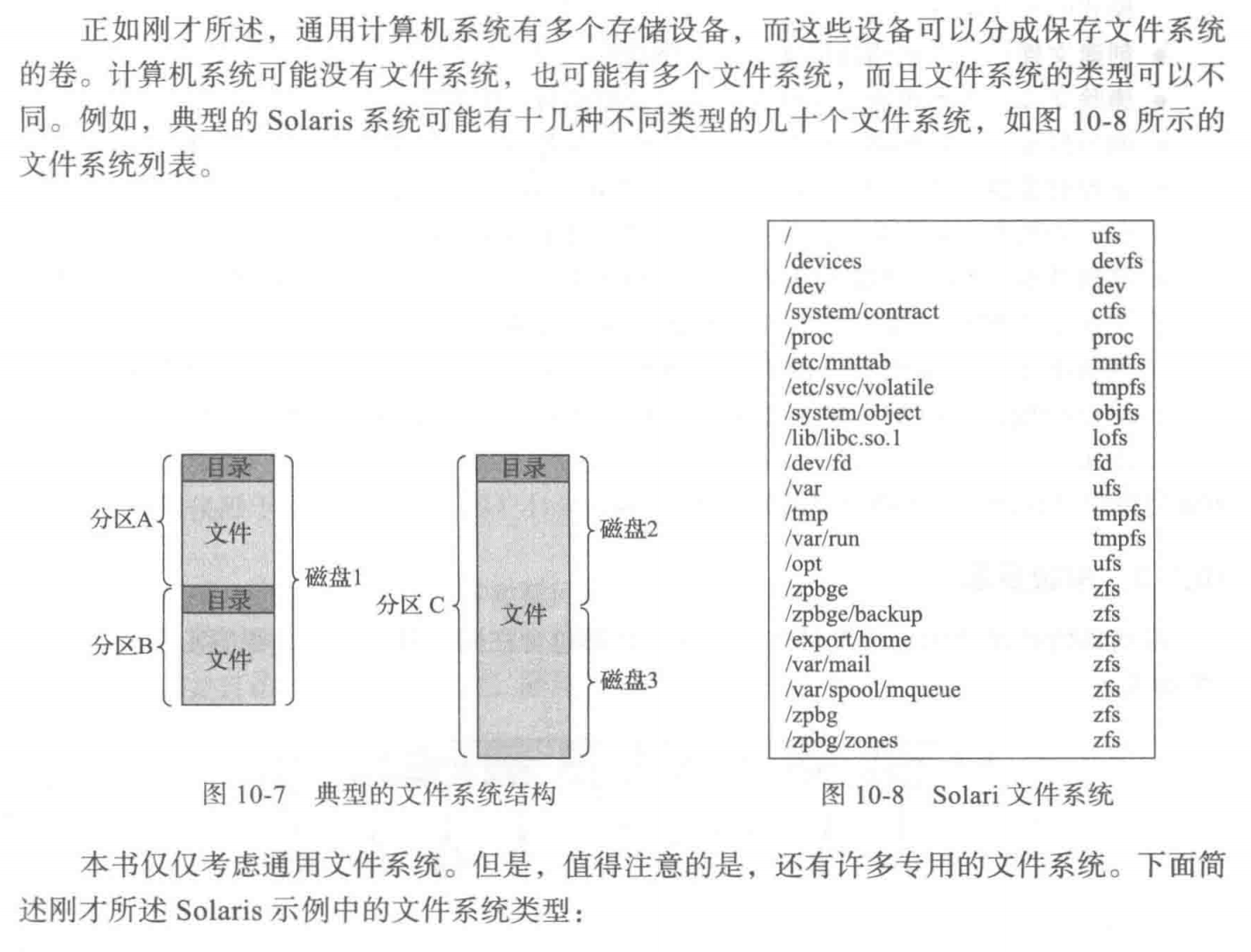
Storage Structure
Directory
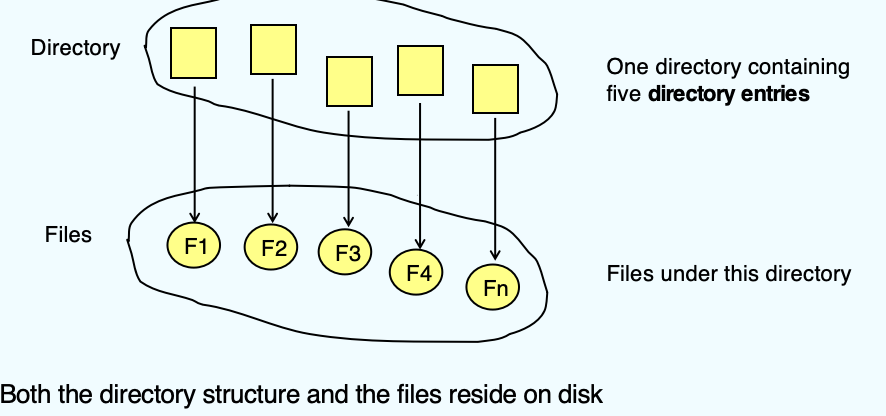
- The directory can be viewed as a symbol table that translates file names into their file control blocks(FCB).
- A collection of nodes containing (management) information about all files
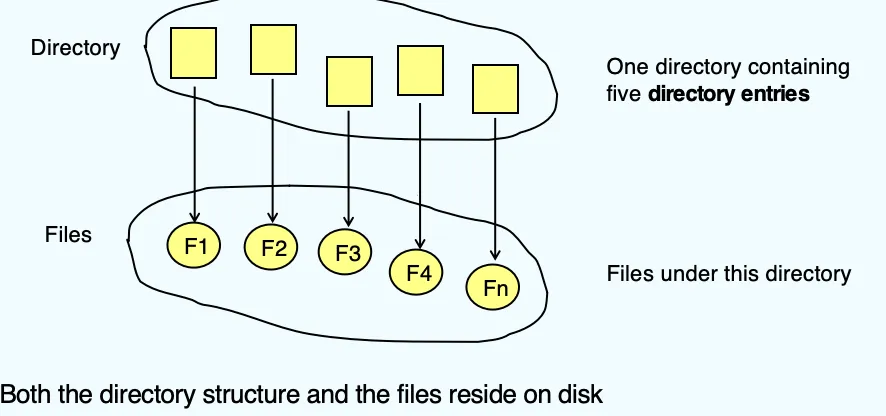
- 上面这张图展示了 Directory 的原理:Directory 中存储的是 directory entries,并非真正的 Files,而是作为一种“指针”指向Files。
- 在这里,为了高效地检索文件,Directory 中存储的是文件的名字 filename,而文件中的数据则存储在文件本身也就是 Files 中。
- 在 Unix 中,甚至会将 Directory 看成一种文件。这就是“万物皆文件”的思想。
Operation Performed on Directory
如果采用上面对目录的定义,我们可以按照许多方式来组织目录。这种组织允许我们进行多种操作:
- Search for a file
- Create a file
- Delete a file
- List a directory
- 需要能够遍历目录内的文件,以及目录内每个文件的目录条目的内容
- Rename a file
- 文件内容和用途改变时,名称也应该改变。这个操作也允许改变其在目录结构中的位置
- Traverse the file system – access every dir and file for backing up.
Organize the Directory (Logically) to Obtain
当我们想要设计一个目录结构的时候,我们应该考虑以下设计原则:
- Efficiency – locating a file quickly
- Naming – convenient to users
- Two users can have same name for different files
- The same file can have several different names
- Grouping – logical grouping of files by properties, (e.g., all Java programs, all games, …)
Single-Level Directory
一种最简单的设计是单级目录。所有的文件都包含在同一目录中:
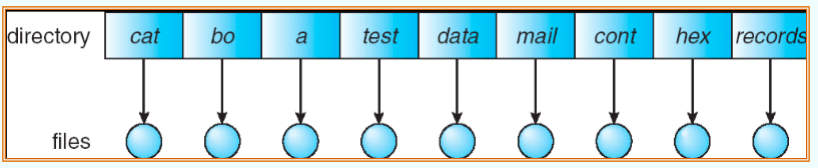
但是,单级目录有两个问题:
- Naming Problem:
- 显然,单级目录无法做到让两个用户对一个文件取两种不同的名称,也无法让两个用户对两个文件取相同的名字
- Grouping problem
- 采用单级目录的话,分类也无法做到
Two-Level Directory
为了解决“两个用户对一个文件取两种不同的名称,也无法让两个用户对两个文件取相同的名字”的问题,我们采用“用户隔离”的方法的 Two-Level Directory,最上面一层的分类是按照用户分的,具体如下:
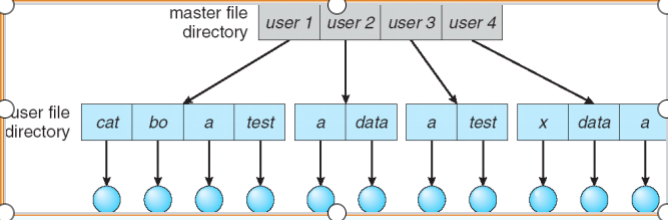
- Path name
- Can have the same file name for different user
- Efficient searching
- No grouping capability
( 有一说一我感觉这和上面的不是一样的吗…)
Tree-Structured Directories
很自然地,我们会联想到怎么讲目录结构扩展到任意高度的树。
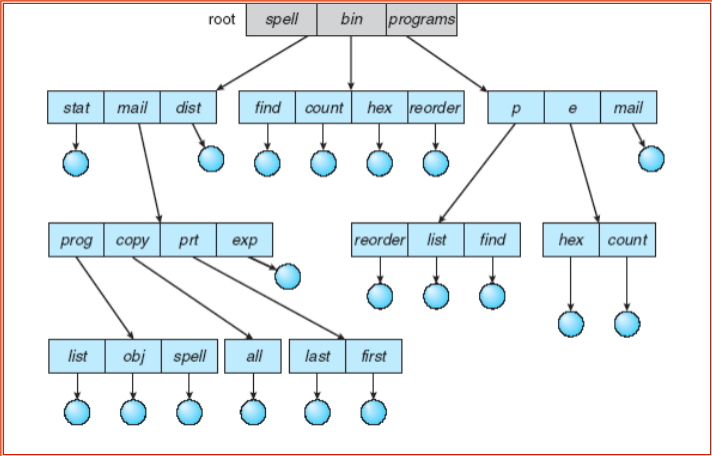
- 在树结构中,有一个根目录,系统内每个文件都有唯一的路径名。
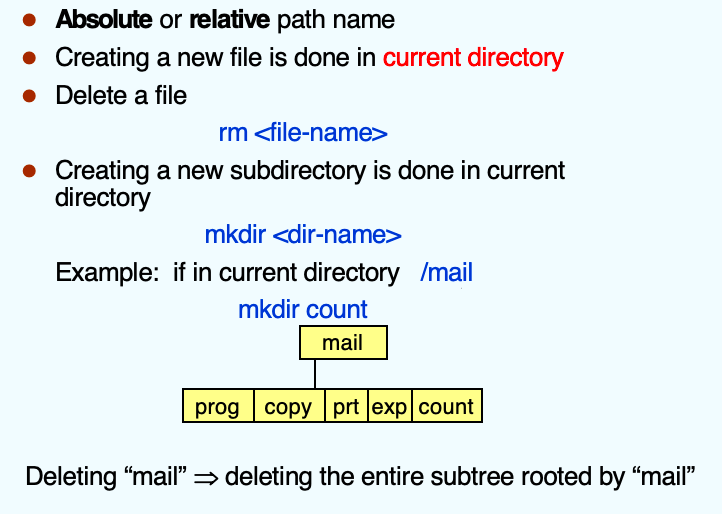
- 常规使用的时候,每一个进程都会有一个当前目录(current directory)
- Each directory entry contains a bit defining the entry as file(0) or directory(1).
- Efficient searching
- Grouping Capability
路径名可以有两种形式:绝对路径和相对路径。
Acyclic-Graph Directories(无环图目录)
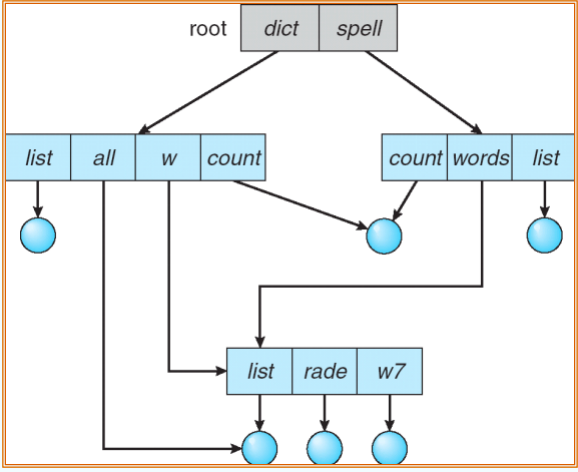
考虑两个程序员,正在开展联合项目。与该项目相关联的文件可以保存在一个子目录中,以区分两个程序员的其他项目和文件。但是,两个程序员都平等地负责该项目,都希望该子目录在自己的目录内。在这种情况下,公共子目录应该共享(shared)。一个共享的目录或文件可同时位于文件系统的两个(或多个)地方。
树结构禁止共享文件或者是目录。于是就需要无环图。
无环图(acyclicgraph),即没有循环的图,允许目录共享子目录和文件。同一文件或子自录可出现在两个不同自录中。无环图是树形自录方案的自然扩展。
链接(Link)
共享文件和目录的实现方法可以有多个。一种常见的方式,例如许多UNIX系统所采用的,是创建一个名为链接的新目录条目。链接(link)实际上是另一文件或子目录的指针。
例如,链接可以用绝对路径或相对路径的名称来实现。当引用一个文件时,就搜索目录。如果目录条目标记为链接,则真实文件的名称包括在链接信息中。通过采用该路径名来解决(resolve)链接,定位真实文件。链接可通过目录条目格式(或通过特殊类型)而很容易加以标识,它实际上是具有名称的间接指针。在遍历目录树时,操作系统忽略这些链接以维护系统的无环结构。
实现共享文件的另一个常见方法是在两个共享目录中复制有关它们的所有信息。因此,两个条目相同且相等。考虑一下这种方法与创建链接的区别。链接显然不同于原来的目录条目;因此,两者不相等。然而,复制目录条目使得原件和复印件难以区分。复制目录条目的主要问题是,在修改文件时要维护一致性。
问题
无环图目录会带来一些问题,比如:
- 文件现在可以有多个绝对路径名。因此,不同的文件名可以指相同的文件。这种情况类似编程语言的别名问题。当试图遍历整个文件系统,如查找一个文件、统计所有文件或将所有文件复制到备份存储等,这个问题变得重要,因为我们不想不止一次地遍历共享结构。
- 另一个问题涉及删除。共享文件的分配空间何时可以被释放和重用?一种可能性是,只要有用户删除它时,就删除它;但是这种操作可能留下悬挂指针(dangling pointer),以指向现在不存在的文件。更糟糕的是,如果剩余文件指针包含实际磁盘地址,而空间随后被重用于其他文件,这些悬挂指针可能指向其他文件的中间。
- 对于链接来说,删除是简单的。对于链接本身,我们可以直接删除;对于文件本体,在删除后若是有剩余链接,我们也可以设计一种机制,检测剩余的链接并删除。
- 另一种方法就是保留文件,直到它的所有的引用都被删除。于是,必须有一种机制来确定文件的最后一个引用已经被删除。

General Graph Directory(通用图目录)
对于无环图来说,一个重要的事情就是要保证图中没有环的出现。但有时这过于困难。通用图允许换的出现,但其也有一点问题:
- If cycles allowed
- Repeated search the same object
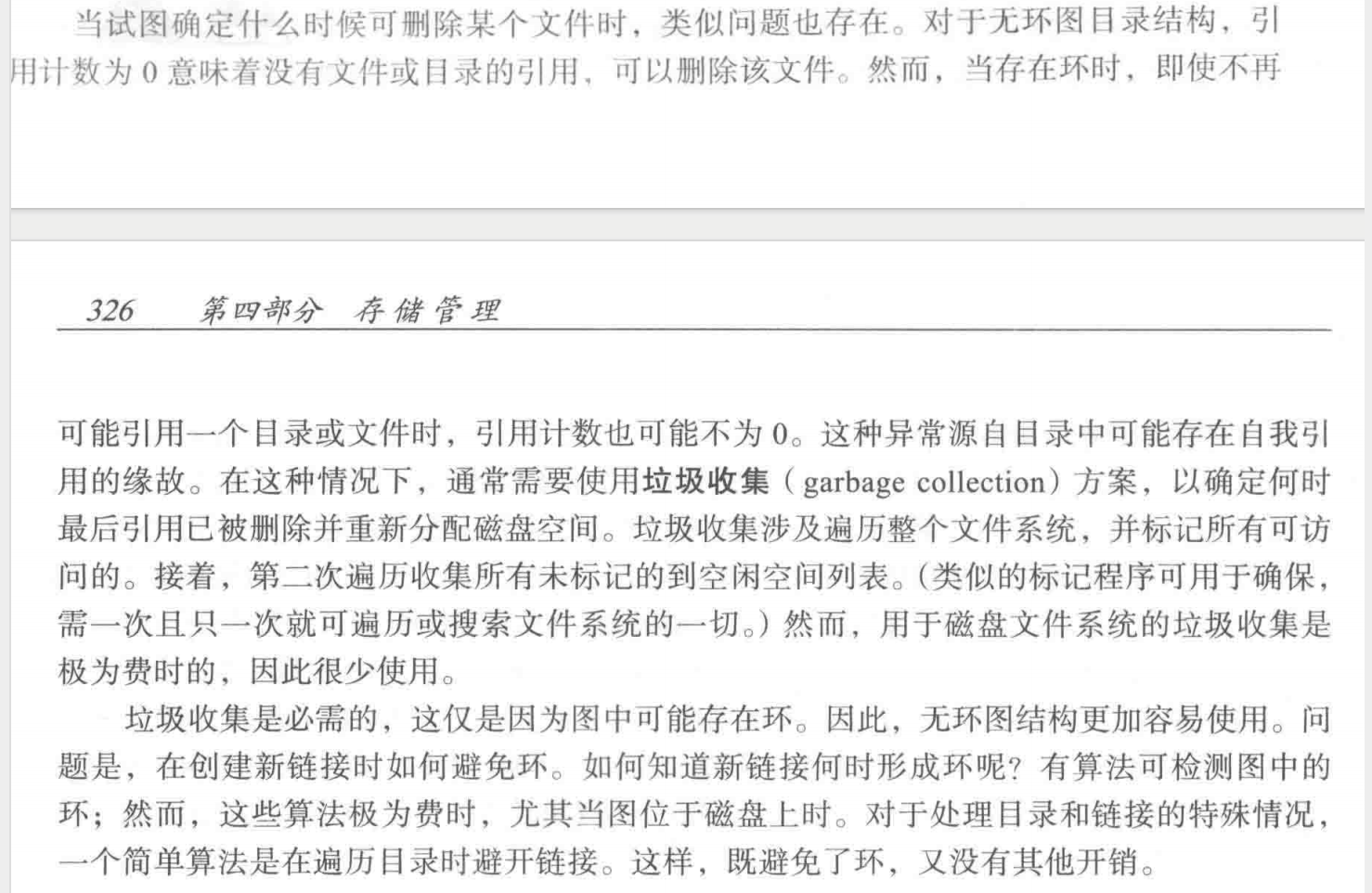
- File deletion problem (count <>0 even if unused)
- How do we guarantee no cycles?
- Allow only links to file not subdirectories
- Garbage collection
- Every time a new link is added, use a cycle detectionalgorithm to determine whether it is OK
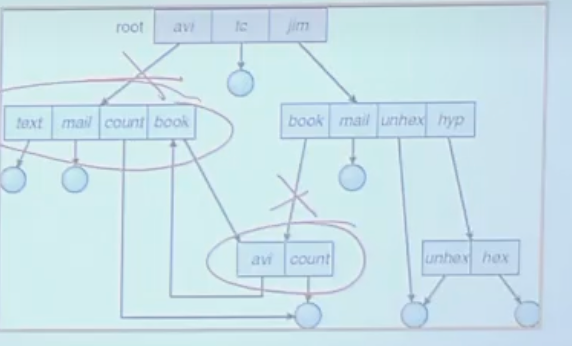
- 有时候,如果两个目录相互链接,那就回造成无限循环:系统认为自己在越走越深,实际上它是在两个目录里面循环
- 同时,环的存在也会导致 garbage 的出现:
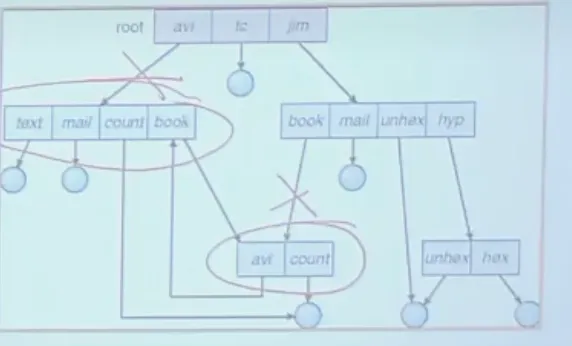
- 例如此时,avi 就成为了 garbage。
Soft and Hard Link
-
硬链接 (Hard Link)
- 硬链接就像是一个文件的**“多个别名”**。当你为一个文件创建硬链接时,你实际上是创建了一个新的文件名,但它指向的 Inode 号码与原文件完全相同。
- 物理表现:磁盘上只有一份数据内容,但有两个(或多个)文件名指向它。
-
软链接 (Soft Link / Symlink)
- 软链接(符号链接)类似于 Windows 里的**“快捷方式”。它是一个独立的新文件,拥有自己的 Inode,但它的内容非常特殊:它记录的是目标文件的路径字符串**。
- 会导致dangling pointer(地址悬空)
- 物理表现:它是一个独立的文件,占用极小的磁盘空间来存储路径。
File System Mounting(文件系统安装)
- A file system must be mounted before it can be accessed
- An un-mounted file system (i.e. Fig. 10-12(b)) is mounted at a mount point
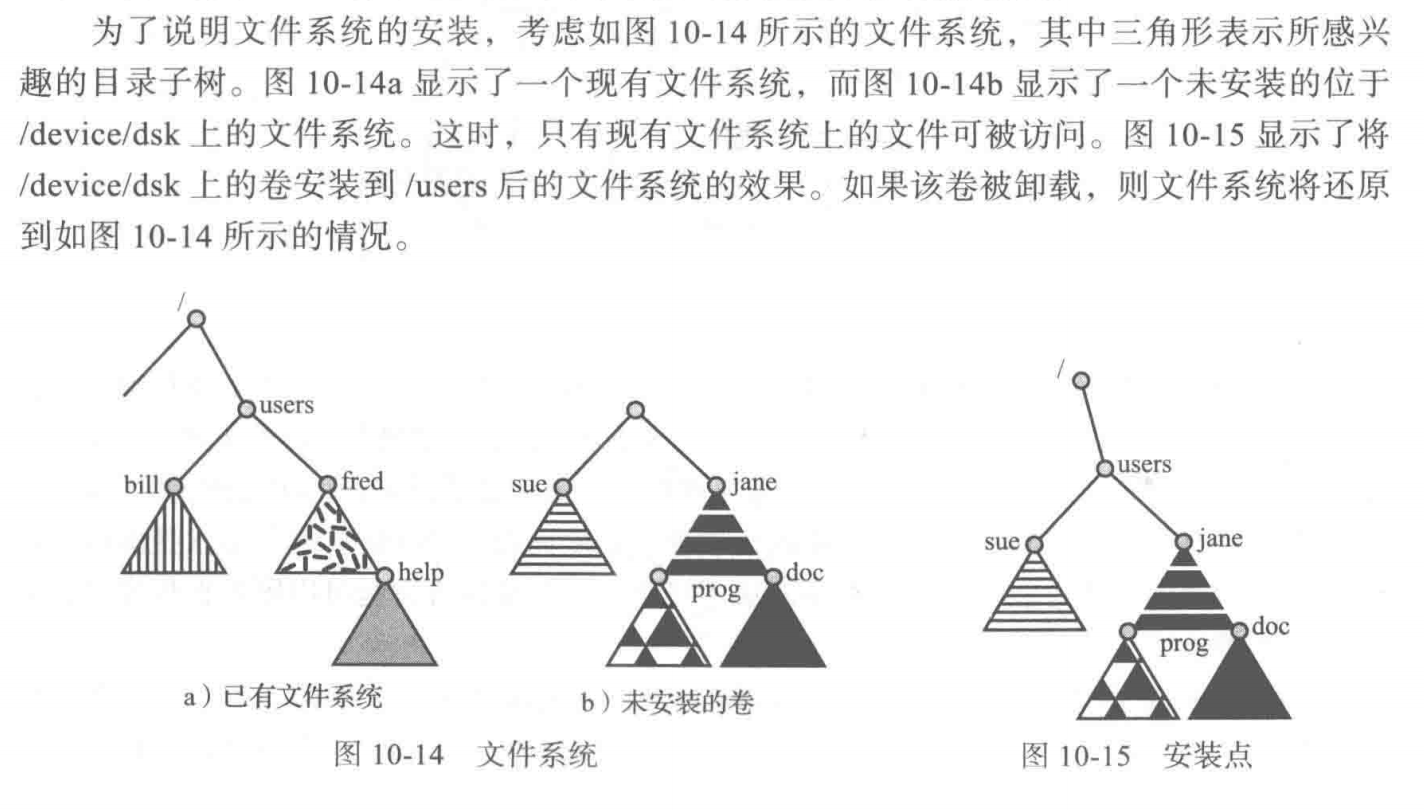
- U 盘插到电脑上,也是这样的一个过程,使其看起来就像我们电脑中的一个磁盘一样。
File Sharing
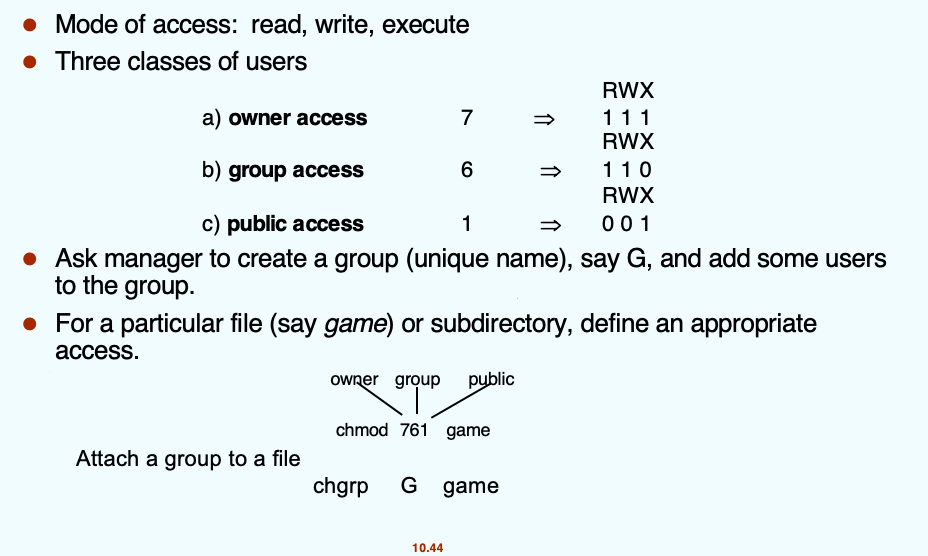
Protection
- File owner/creator should be able to control:
- what can be done
- by whom
- Types of access
- Read
- Write
- Execute
- Append
- Delete
- List
Access Lists and Groups